

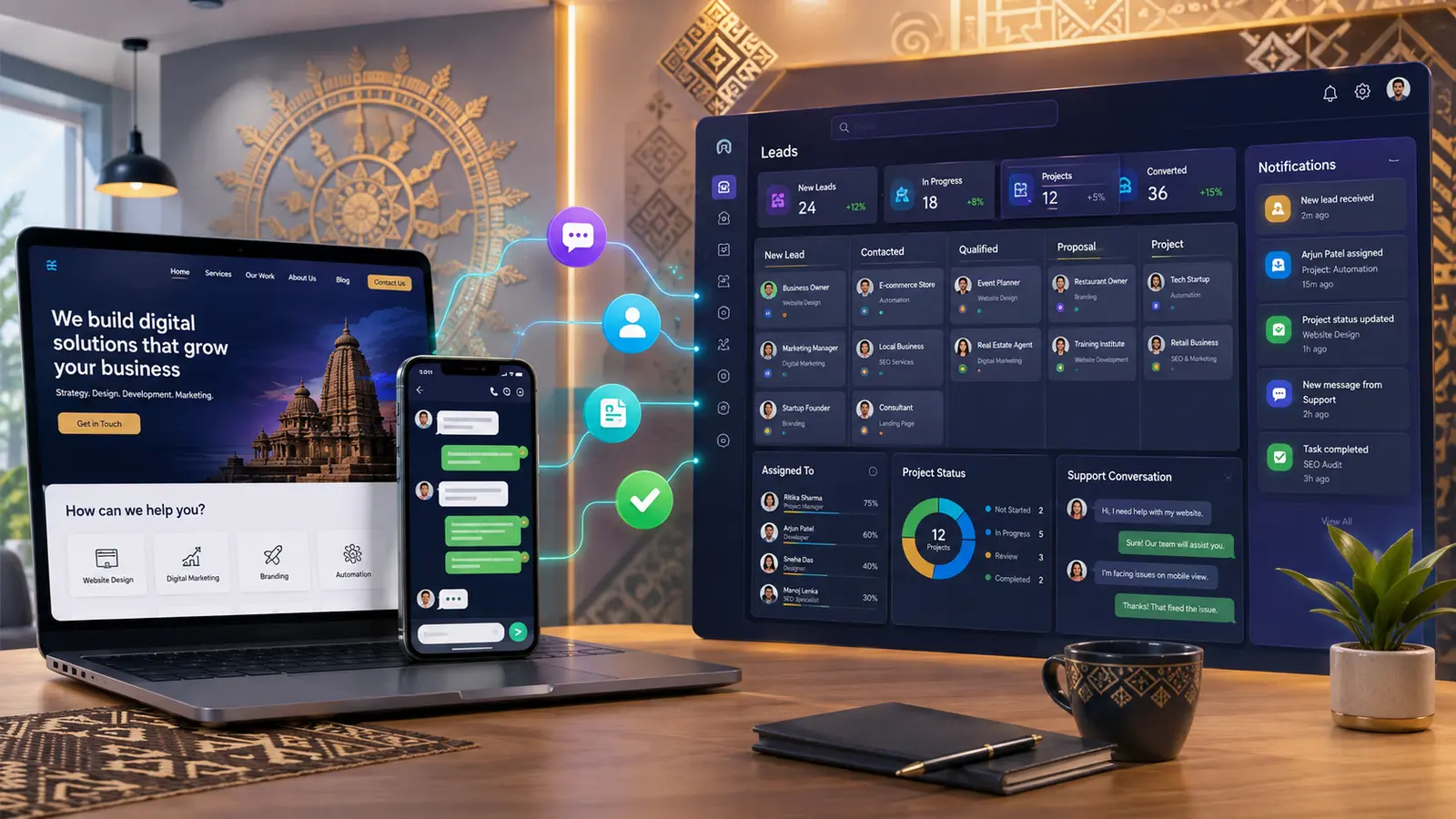
WhatsApp CRM integration in Balasore can help businesses organise enquiries that begin on a website or messaging channel. Without a clear process, customer names, requirements, quotations and follow-ups become scattered across phones and inboxes.
Balasore Web Services can connect website enquiries, approved messaging workflows, live chat and client dashboards with project-management or CRM functions. This guide explains useful features, consent and privacy considerations, and how automation should support—not replace—human communication.
What is WhatsApp CRM integration?
It is a workflow that connects permitted WhatsApp communication with a system used to record leads, clients, conversations, assignments and follow-ups. Integration options depend on the official business platform, provider approval, message categories and applicable charges.
Benefits of WhatsApp CRM integration in Balasore
- Capture website enquiries in one organised list
- Assign a lead or project to the correct team member
- Record service requirements and quotation status
- Set follow-up tasks and reminders
- Keep approved conversation context with the customer record
- Send relevant status or payment notifications when permitted
- Measure response and conversion stages
A practical customer journey
- A visitor submits a website form or starts an approved chat.
- The system creates an enquiry with source and requirement.
- An administrator reviews and assigns it.
- The team contacts the customer through the agreed channel.
- Quotation, notes and next action are recorded.
- An accepted enquiry can become a project.
- The client may see progress, files, payments or subscriptions in a dashboard.
Useful CRM features for service businesses
Enquiry pipeline
Stages such as new, contacted, qualified, quoted, accepted and closed make the next action easier to see.
Client and project records
Contact details, selected services, scope, value, due dates, files and communication can be organised around the client.
Payment follow-up
Authorised staff can create payment requests and track submitted references or verified transactions. Sensitive PINs and banking credentials must never be collected.
Support and live chat
Website live chat can help visitors before they become clients, while dashboard messaging can support an active project. Access and retention rules should be defined.
Reports
Lead source, response time, quotation status and conversion can be reviewed without relying on memory.
Consent, privacy and messaging rules
A phone number is personal data. The website should explain why it is collected and how the business will communicate. Marketing messages require appropriate permission, and official platform rules must be followed. Customers should have a way to stop non-essential messages.
Use role-based access, retain only necessary information and avoid copying conversations into unsecured spreadsheets. Never request a UPI PIN, OTP, card PIN or banking password through chat.
Automation that helps rather than annoys
Good automation acknowledges an enquiry, collects essential details, routes it correctly and alerts a human. Poor automation traps customers in endless menus or sends repeated promotional messages.
Start with a few high-value actions: confirmation, assignment, reminder and status update. Add more only when the benefit is clear and permission is appropriate.
Why choose Balasore Web Services?
We can connect the public website, enquiry forms, chat, client dashboard, project information and payment workflow as one journey. Web application and SaaS services start from ₹3,999 for a limited defined requirement; final integration pricing depends on roles, channels, provider charges and automation.
Explore our services, SaaS development guide and portfolio.
Frequently asked questions
Can website enquiries automatically enter the CRM?
Yes, a properly secured form can create an enquiry record with the selected service and visitor details.
Can an administrator assign the enquiry as a project?
Yes, an approved enquiry can be linked to a client account and converted into a project workflow when this feature is included.
Can WhatsApp messages be automated?
Official business-platform tools support approved automation, subject to consent, templates, platform rules and provider pricing.
Can customers chat with an administrator?
A website chat or dashboard conversation system can be created. Availability, response expectations and privacy should be clearly communicated.
Is WhatsApp integration free?
Website click-to-chat may be simple, while official API, provider, template and conversation charges can apply to advanced workflows.
Organise every enquiry
WhatsApp CRM integration in Balasore should make communication clearer and more accountable. Contact Balasore Web Services with your enquiry stages, user roles and required notifications for a scoped proposal.
Official reference: Review the WhatsApp Business Platform overview for official platform information.


0 reader comments
Share a relevant question or experience. Comments are reviewed before publication.